Crossword Quest
- 4.7
- Rating
- 10.00M
- Installs
- Free
- Price
 Analysis by App-foxy
I approached Crossword Quest as the kind of word game I could open for a few minutes, play without preparation, and return to whenever I wanted a light mental workout. It is a free word game from Words Mobile, built around crossword-style puzzles rather than long explanations or complicated controls. That simple starting point is its biggest strength: the game is easy to understand almost immediately, but it still gives me enough room to improve how I search for answers.
After spending time with it, I see it as a good fit for people who enjoy arranging letters, testing vocabulary, and solving at their own pace. It is less suitable for someone looking for a story-driven adventure, competitive multiplayer, or a highly customizable puzzle experience. The presentation is focused on the central word challenge, so the value comes from the rhythm of solving rather than from a large collection of side systems.
How the basic solving routine feels
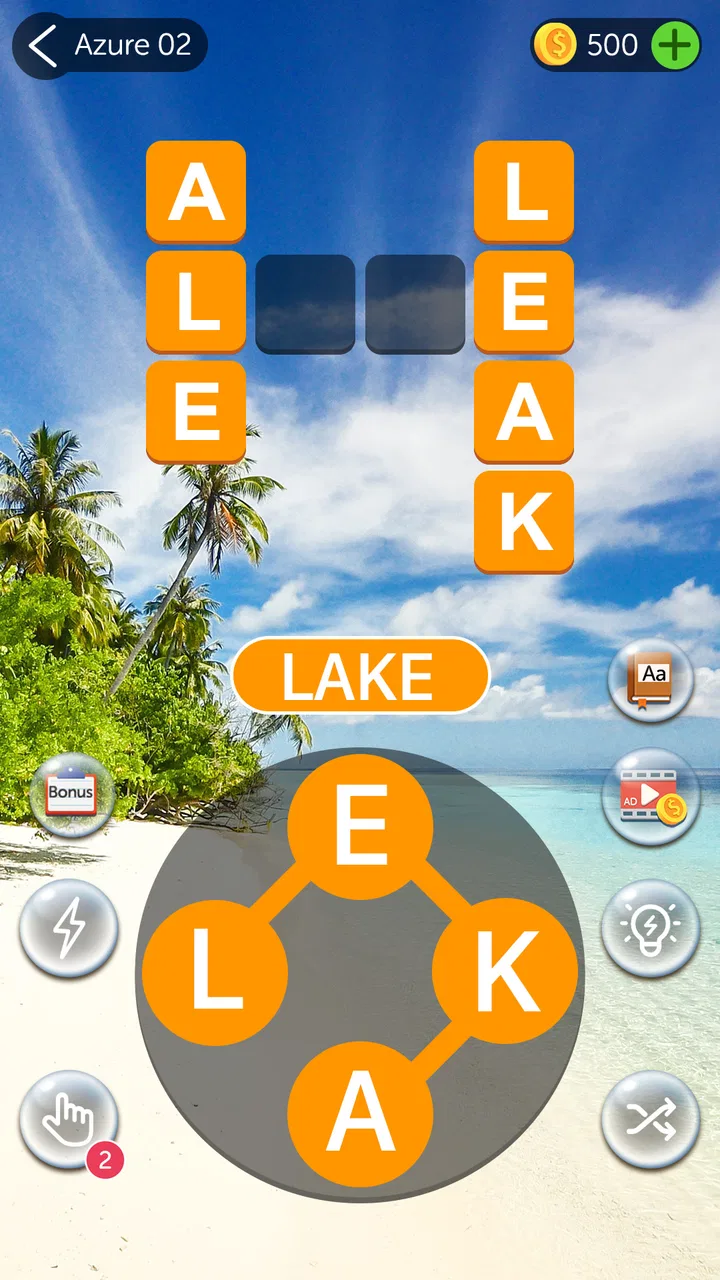
The normal workflow is pleasantly direct. I look at the available letters, consider the words they might form, and place answers into the crossword structure. When I get stuck, I stop trying to force a complete solution and instead search for shorter, more familiar words. That small change in approach often helps reveal the shape of the remaining spaces.
You May Also Like

 Blood Strike: 2.5 Anniversary
Blood Strike’s Loadouts Turn Every Drop Into a Tactical Gamble
A close look at Blood Strike’s custom loadouts: how fast access to signature weapons reshapes its battle royale rhythm, rewards preparation, and narrows the gap between fights.

 Pandora - Music & Podcasts
Pandora’s Music Is Easy to Start, but Harder to Recover
Pandora’s strength is its low-effort path from a seed to a station. Its weak spot is how much confidence it asks you to place in connection, setup, and quiet recovery.

 8 Ball Pool
 Is Built on Rivalries, Rematches, and Routine
A close look at the rivalries, rematches, shared routines, and unanswered safety questions that turn a quick pool match into a persistent mobile community.

 Samsung Music
’s Quiet Strength Is Playing What You Already Own
Its reach comes less from spectacle than from dependable access to a personal library. That simplicity is both the app’s strongest retention engine and its ceiling.

 AccuWeather: Weather Radar
AccuWeather Review: A Quick, Clear Forecast for Everyday Decisions
For everyday plans, the best forecast is the one you can understand quickly. AccuWeather makes rain timing, radar, and local conditions easy to act on, with a few trade-offs.

 Hill Climb Racing
Why Hill Climb Racing Still Turns Crashes Into One More Run
A tiny car, a bumpy hill and one more upgrade: Hill Climb Racing keeps resurfacing because its simple chaos makes every near-miss feel personal.
More From Our News Desk
View All News


This makes the game useful in everyday situations where I do not want to commit to a long session. I can play while waiting for an appointment, during a short break, or at the end of the day when I want something more active than scrolling. The controls are approachable enough for casual players, while the word combinations give experienced puzzle fans a reason to pay attention rather than tapping randomly.
One habit improved my results more than I expected: I separate words I recognize instantly from words that merely look possible. I place the obvious answers first, then use the newly filled letters as clues. This avoids wasting time on speculative combinations and turns each completed entry into a useful piece of information for the next one.
The crossword format also creates a satisfying balance between recall and deduction. I am not relying only on vocabulary. A partially completed row can suggest a word I would not have considered from the letter group alone, while an unusual word can become obvious once its position is constrained. That interaction is what keeps the game from feeling like a simple anagram list.
For younger players and families, the Everyone content rating makes the game approachable. I would still treat it as a vocabulary activity rather than a formal learning tool. It can encourage spelling awareness and word recognition, but it does not replace a structured language lesson. Adults who want a quiet brain teaser will probably get more from it than users expecting detailed definitions or educational explanations.
What I do before spending hints
When a puzzle resists me, I use a repeatable order instead of immediately reaching for assistance. First, I scan for the shortest likely answers. Then I check whether a familiar ending or beginning can fit one of the open spaces. After that, I try rearranging the unused letters mentally, paying attention to combinations that commonly appear together. Only when those steps fail do I consider using help.
This approach matters because hints are most valuable when they remove a specific obstacle. Using one too early can make the rest of a puzzle feel passive. I prefer to preserve that small moment of discovery, especially when I am playing for relaxation rather than speed.
A practical everyday example is a short evening session after work. I might solve the easy entries quickly, pause when two possible words compete for the same spaces, and return later with a fresh view. Because the game does not require a large setup, that pause feels natural. It is easy to treat a puzzle as a small break instead of turning it into a demanding task.
Settings and routine checks that are worth making
Before settling into regular play, I recommend checking the available in-game options and the device’s sound behavior. Word games are often played in quiet places, so I prefer to make sure audio feedback is comfortable for the setting. If I am playing around other people, I keep the phone discreet; if I am at home, a little feedback can make each completed answer feel more responsive.
I also pay attention to how the game behaves around interruptions. A phone call, notification, or brief switch to another app can break concentration, particularly when I am holding several possible words in mind. My useful habit is to finish a clear move before leaving the puzzle whenever possible. That reduces the chance of returning and forgetting which letter pattern I was testing.
The game is free to download and play, but it includes optional in-app purchases ranging from $0.99 to $49.99 per item. I would not decide whether to keep playing based only on the existence of those purchases. Instead, I would first establish whether the basic puzzle loop is enjoyable without buying anything. For a casual player, that is the sensible test: play naturally, learn when assistance is genuinely useful, and avoid treating every difficult moment as a reason to spend.
Because the game is designed for a broad audience, I would also check the device’s general purchase controls if a child may use the phone or tablet. That is not specific to solving crossword puzzles, but it is a practical step whenever optional purchases are available. The game’s Everyone rating makes it family-friendly in age terms, while purchase decisions still deserve adult attention.
Patterns that help me solve faster
The fastest improvement does not come from memorizing huge word lists. It comes from recognizing patterns. I look for common short forms first, then examine the letters that remain after those entries are placed. A single confirmed letter can transform an open-ended search into a much narrower choice, so I treat every correct answer as a clue for the whole board rather than an isolated win.
I also avoid reading the letter group in only one direction. When I repeatedly cycle through the same arrangement, I tend to see the same obvious words and miss alternatives. I mentally change the starting point, group letters by familiar sounds, and look for endings that might complete a word. This is especially helpful when the remaining answer is not the first combination that comes to mind.
Another useful technique is to delay commitment when two answers seem plausible. I note which spaces each possibility would affect and choose the option that creates the strongest cross-checks. In practice, the correct word often becomes clear because it supports more of the surrounding structure. This is a better strategy than selecting whichever word feels most familiar.
I find it helpful to play in two different modes. In a relaxed session, I allow myself to experiment and use the game as a vocabulary warm-up. In a focused session, I reduce distractions, solve the most certain entries first, and keep my attention on the board’s remaining constraints. Switching deliberately between these modes prevents the game from becoming either stressful or mindless.
Players who already enjoy newspaper crosswords may notice an important difference. Traditional clue-based crosswords usually ask me to interpret definitions, references, or wordplay. Crossword Quest places more emphasis on manipulating available letters and seeing how they fit together. That makes it more immediately accessible, but it may feel less rich to someone who specifically wants cryptic clues, cultural references, or elaborate clue writing.
Compared with a basic anagram app, the crossword structure gives me stronger direction. I am not simply producing every word I can find; I am using placement and intersections to decide what matters. Compared with a full language-learning app, however, the experience is lighter. I get practice recognizing and assembling words, but not the broader lessons, pronunciation work, or detailed explanations that a dedicated study tool might provide.
Where experienced play reaches its limits
The central loop is accessible, and that also defines its limits. Players who want deep strategic systems, character progression, elaborate challenges, or extensive social competition may find the experience too narrow. Its appeal depends on enjoying the act of finding words. If that activity does not hold your attention by itself, extra play time is unlikely to solve the problem.
I would also avoid treating the game as a reliable measure of vocabulary ability. Familiarity with common word patterns helps, but puzzle success can depend on how quickly I notice arrangements and how well I use the board’s structure. Someone with strong general vocabulary may still hesitate on a particular combination, while a practiced player can improve through pattern recognition without knowing unusually advanced words.
There is a trade-off between convenience and depth. Short sessions make the game easy to fit into a busy day, but they can also make progress feel incremental. If I want a large, absorbing puzzle that occupies an entire afternoon, I would choose a more elaborate crossword platform. If I want something I can start immediately and leave without losing much momentum, this format is more appropriate.
The optional purchase range is another point to consider. I appreciate having a free entry point, but players who rely heavily on assistance should think about how quickly small purchases could become part of their routine. My recommendation is to make hints a deliberate tool for occasional dead ends, not an automatic response to every pause. That preserves both the challenge and the value of playing.
Device compatibility is reasonably broad, with a minimum operating system requirement of Android 6.0. That makes it relevant to people using older supported Android devices, although the experience can still vary with screen size, responsiveness, and the way a particular phone handles interruptions. I would keep expectations practical: the game is about clear letter interaction, not demanding graphics or console-style presentation.
Who should install it, and who should pass
I would recommend it to casual word-game fans, crossword beginners, families looking for an accessible puzzle, and anyone who enjoys a short daily mental exercise. It is especially appealing if you like discovering that a few letters can produce more possibilities than you first expected. The free price makes it easy to try without committing to a purchase at the start.
I would point regular cryptic crossword solvers toward a more clue-focused alternative if they want layered definitions and wordplay. I would also suggest a dedicated language app for someone whose main goal is systematic vocabulary growth. Players seeking online competition or a story should look elsewhere as well, because this game’s strongest feature is its focused solo solving loop.
The game has built a substantial audience, with a 4.7 average from around 139 thousand ratings and over 10 million installs. Those figures suggest that its straightforward format connects with many players, but popularity does not remove the need to match the game to your preferences. I would judge it by whether arranging letters and completing compact crossword patterns feels rewarding to you.
My final view after building a repeatable habit
Crossword Quest works best when I use it intentionally: check the settings before a quiet session, solve certain entries first, use cross-checks instead of guessing, and reserve assistance for genuine roadblocks. Those habits make the game feel more thoughtful without turning it into homework. They also reveal its main quality: a simple interface can still support better decision-making when the player pays attention to patterns.
Words Mobile has kept the focus on an approachable word puzzle, and the current version, 2.3.9, fits that role well. I like that I can recommend it to someone who wants an uncomplicated free game, while still being honest that it will not satisfy every type of puzzle fan. Its age rating is Everyone, and the optional purchases mean adults should remain aware of spending controls when sharing a device.
My recommendation is simple: try it if you want a compact crossword-style routine, not a full educational course or a competitive platform. I would install it for short breaks, use the board’s intersections as my main solving tool, and stop before hints replace the satisfaction of finding the answer. For that particular kind of relaxed word play, Crossword Quest is an easy game to keep nearby and return to regularly.
FAQs for Crossword Quest
01What is Crossword Quest and how does it work?
Crossword Quest is a word puzzle game where players fill in crossword grids using letter tiles. The game challenges your vocabulary and problem-solving skills as you connect letters to form words. With a variety of levels and increasing difficulty, it provides a fun and engaging way to improve your language skills.
02Is Crossword Quest free to download and play?
Yes, Crossword Quest is free to download and play on both Android and iOS devices. While the base game is free, it does offer in-app purchases for hints and additional content. These purchases are optional and are not required to enjoy the main features of the game.
03Do I need an internet connection to play Crossword Quest?
Crossword Quest can be played offline, allowing users to enjoy the game without an internet connection. However, certain features, such as updates and in-app purchases, require an internet connection. Playing offline makes it a great option for travel and situations where connectivity is limited.
04How challenging is Crossword Quest for new players?
Crossword Quest starts with simple puzzles to ease new players into the gameplay. As players progress, the puzzles become more complex, offering a satisfying challenge for both beginners and experienced players. The game is designed to adapt to various skill levels, making it accessible and enjoyable for everyone.
05Are there any educational benefits to playing Crossword Quest?
Yes, Crossword Quest offers several educational benefits. It helps improve vocabulary, spelling, and cognitive skills as players work through puzzles. The game encourages problem-solving and critical thinking, making it a fun and effective tool for learning and mental stimulation, suitable for all age groups.
Pros
- Engaging puzzles enhance cognitive skills.
- Wide variety of levels for all players.
- Offline play available for travel.
- User-friendly interface with hints.
- Regular updates with fresh content.
Cons
- Ads can interrupt gameplay experience.
- Limited free hints available daily.
- Some levels feel repetitively similar.
- In-app purchases can be pricey.
- No multiplayer or social features.

Crossword Quest
Gallery